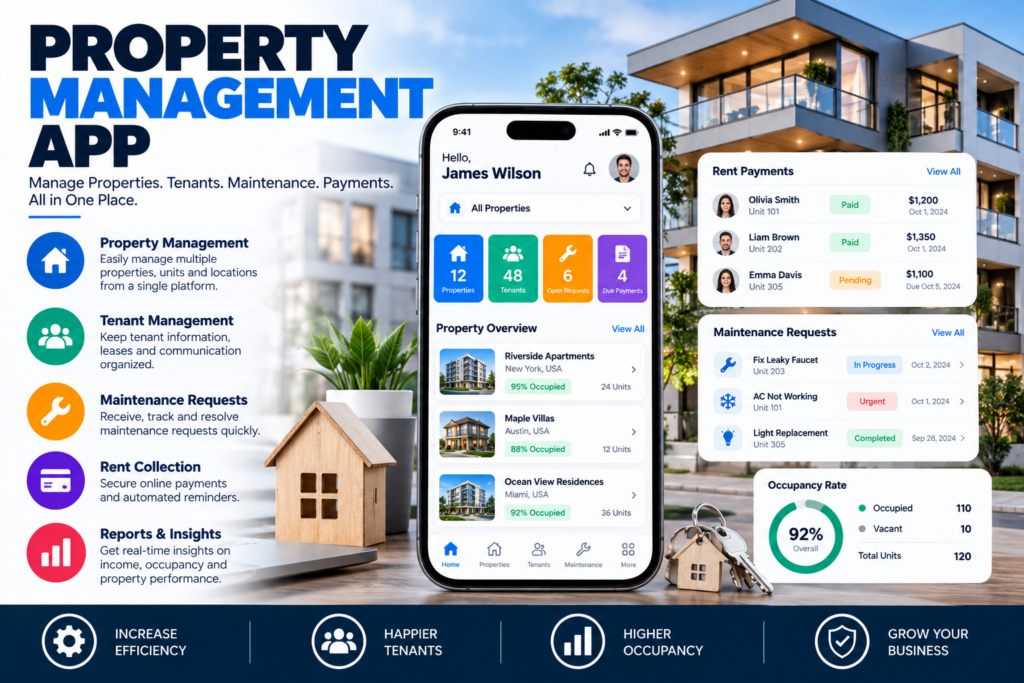
Managing rental properties involves much more than collecting rent. Property managers and landlords must coordinate maintenance, communicate with tenants, track payments, manage leases, organise documents and monitor property performance. Handling these responsibilities manually can become time-consuming, especially when managing multiple properties.
This is where a Property Management App can make a significant difference.
A well-designed application brings essential property management activities into one digital platform. It helps landlords, property managers and tenants access relevant information, complete routine tasks and communicate more efficiently.
However, not every application offers the same functionality. Choosing the right features is essential for creating a practical solution that meets the needs of property owners, tenants and management teams.
In this guide, we’ll explore 10 essential Property Management App features, explain how they work and discuss how they can improve efficiency, tenant satisfaction and day-to-day property operations.
What Is a Property Management App?
A Property Management App is a mobile or web application designed to help landlords, property managers and real estate businesses manage rental properties and related activities.
Depending on its purpose, an application may support tasks such as:
- Managing property listings.
- Organising tenant information.
- Tracking rental payments.
- Managing leases and documents.
- Scheduling maintenance.
- Communicating with tenants.
- Recording property expenses.
- Generating financial reports.
- Managing inspections.
- Automating administrative tasks.
Some applications are built specifically for landlords with a small portfolio, while others support property management companies responsible for hundreds or thousands of rental units.
The best solution depends on the size of the property portfolio, the number of users and the complexity of the business’s operations.
Why Is a Property Management App Important?
Property management becomes more complicated as the number of properties and tenants increases.
Information may be spread across spreadsheets, emails, messaging applications and paper documents. This can make it difficult to identify outstanding payments, track maintenance requests or find important records quickly.
A centralised Property Management App can help organise these activities within a single system.
Improves Operational Efficiency
Digital workflows can reduce repetitive administrative tasks and make important information easier to access.
Enhances Tenant Communication
Tenants can use supported communication features to ask questions, submit requests and receive updates.
Simplifies Financial Tracking
Property managers can monitor rent payments, expenses and outstanding balances more systematically.
Supports Better Organisation
Digital records help keep leases, property details and maintenance histories organised.
Improves the Tenant Experience
Convenient access to payments, documents and maintenance requests can make renting easier for tenants.
These benefits depend on how well the application is designed, implemented and integrated with existing business processes.
10 Essential Features Every Property Management App Should Have
1. Property and Portfolio Management
Property management starts with maintaining accurate information about each property.
A dedicated property management feature allows landlords and property managers to organise their portfolios and access relevant details without searching through multiple files.
A well-designed Property Management App should allow authorised users to record information such as:
- Property addresses.
- Property types.
- Number of bedrooms and bathrooms.
- Rental prices.
- Occupancy status.
- Property photographs.
- Ownership or management details.
- Inspection records.
- Associated tenant information.
For example, a property manager responsible for 30 rental apartments could use the application to view the status of each unit, identify vacant properties and access relevant property records.
The application may also provide filters that allow users to organise properties by location, occupancy, property type or other criteria.
Why it matters: Centralised property information makes portfolio management more organised and helps users retrieve important details quickly.
2. Tenant Management and Communication
Tenant management is another essential part of rental property operations.
Landlords and property managers need to maintain accurate tenant information, coordinate communication and keep track of tenancy-related activities.
A tenant management module can provide a central place for authorised users to manage relevant information.
Useful features include:
- Tenant profiles.
- Contact details.
- Tenancy start and end dates.
- Lease information.
- Communication history.
- Important tenancy reminders.
- Document access.
- Tenant-specific requests.
Some applications also provide tenant portals that allow residents to view selected information and contact their property manager.
For example, a tenant could submit a question about a repair and receive updates through the application instead of sending several separate emails.
Access to personal information should be restricted according to each user’s role and legitimate requirements.
Why it matters: Organised tenant records and communication tools help reduce confusion and support more consistent service.
3. Rent Collection and Payment Tracking
Rent collection is one of the most important functions for landlords and property management businesses.
Tracking payments manually can become difficult when multiple tenants have different rental amounts, payment dates and tenancy arrangements.
A Property Management App can simplify this process by recording payments and displaying relevant financial information.
Potential features include:
- Rental payment schedules.
- Payment status tracking.
- Upcoming payment reminders.
- Outstanding balance records.
- Digital payment options.
- Payment receipts.
- Transaction histories.
- Financial summaries.
Where payment processing is supported, the application can integrate with a suitable payment provider.
For example, a landlord managing several properties could review which payments have been recorded and which accounts require follow-up.
The application should distinguish between a payment that has been initiated and one that has actually been confirmed.
Payment processing, financial reporting and access to transaction records should also follow appropriate security and regulatory requirements.
Why it matters: Clear payment records help landlords monitor rental income and reduce the administrative effort involved in reconciling payments.
4. Maintenance Requests and Work Order Management
Maintenance is an unavoidable part of managing rental properties.
Tenants may report leaking taps, heating problems, damaged appliances or other issues that require attention. Without an organised system, requests can be overlooked or difficult to track.
A maintenance management feature allows tenants to report problems and property managers to coordinate the response.
Important functionality may include:
- Maintenance request submission.
- Photographs of reported issues.
- Request categorisation.
- Priority levels.
- Assignment to contractors.
- Appointment scheduling.
- Status updates.
- Repair histories.
- Completion confirmation.
For example, a tenant could report a plumbing issue through the application. The property manager could assign the request to a contractor, record the appointment and update the status once the repair is complete.
The system can also maintain a history of repairs associated with each property.
Urgent issues should have clear escalation procedures rather than relying solely on an application notification.
Why it matters: Structured maintenance workflows help property managers monitor outstanding work, communicate progress and maintain better property records.
5. Lease and Document Management
Rental property businesses handle a considerable amount of documentation.
Depending on the jurisdiction and tenancy arrangement, documents may include tenancy agreements, inspection reports, inventories, certificates, invoices and correspondence.
A document management feature allows authorised users to store, organise and retrieve these records digitally.
Useful capabilities include:
- Secure document storage.
- Document categorisation.
- Search and filtering.
- Lease start and end dates.
- Renewal reminders.
- Version tracking.
- Document sharing with authorised users.
- Download and export options.
- Access history.
Some applications may also support electronic signatures through a suitable integration.
For example, a property manager could receive a reminder that a tenancy agreement is approaching its end date and review the relevant documentation before contacting the tenant.
The system should use appropriate access permissions to prevent tenants or staff from viewing documents they are not authorised to access.
Why it matters: Digital document management improves organisation and makes important records easier to locate when required.
6. Automated Notifications and Reminders
Property managers often need to remember important dates and follow up on outstanding tasks.
These may include rent due dates, lease renewals, property inspections, maintenance appointments and compliance-related deadlines.
A Property Management App can automate selected reminders and notifications based on predefined rules.
For example, the system could send:
- Rent payment reminders.
- Maintenance appointment updates.
- Inspection notifications.
- Lease expiry alerts.
- Document renewal reminders.
- Messages when a maintenance request changes status.
- Notifications about newly assigned tasks.
Users should be able to configure relevant notification preferences and avoid receiving unnecessary messages.
Automated reminders can also be linked to the application dashboard, allowing managers to see upcoming responsibilities when they sign in.
For legally important notices, the application must follow the relevant legal requirements for content, timing and delivery. A standard push notification should not automatically be treated as a valid substitute for formal notice where specific procedures apply.
Why it matters: Automated notifications help users stay organised and reduce the risk of overlooking routine administrative tasks.
7. Financial Reporting and Expense Tracking
Understanding property performance is essential for making informed business decisions.
Landlords may need to monitor rental income, maintenance expenses, insurance costs, management fees and other property-related expenditure.
A financial reporting feature can bring this information together into useful summaries.
Depending on the application, reports may include:
- Rental income summaries.
- Outstanding payment records.
- Maintenance expenditure.
- Property-level expenses.
- Occupancy information.
- Monthly and annual comparisons.
- Downloadable financial reports.
- Budget tracking.
For example, a property owner could compare maintenance expenses across several properties to identify units that require more frequent repairs.
The application may also support exporting records to accounting software, reducing the need to enter the same information in multiple systems.
Financial reports should clearly explain their calculations and distinguish recorded transactions from estimates.
Why it matters: Accessible financial information helps property owners monitor costs, evaluate performance and plan future expenditure.
8. Property Inspections and Digital Checklists
Regular property inspections can help landlords and property managers monitor property condition and document issues.
A digital inspection feature allows users to record observations directly through a mobile device.
Useful features include:
- Inspection scheduling.
- Digital checklists.
- Property condition notes.
- Photographs.
- Time-stamped records.
- Follow-up tasks.
- Inspection reports.
- Links to maintenance requests.
For example, a property manager conducting an inspection could record the condition of different rooms, attach photographs and create maintenance tasks for issues that require attention.
The application should support appropriate recordkeeping and access controls, particularly when inspection reports contain tenant information.
Inspections must also be arranged in accordance with applicable tenancy laws, contractual requirements and privacy expectations.
Why it matters: Digital inspections help create more consistent records and make it easier to track property condition over time.
9. Role-Based Access and Security
A property management platform may be used by landlords, property managers, tenants, accountants and maintenance contractors.
These users do not all need access to the same information.
For this reason, role-based access control is an important feature of a secure Property Management App.
For example:
- Landlords may need portfolio and financial information.
- Property managers may need access to assigned properties and tenant records.
- Tenants may need access to their own tenancy information.
- Contractors may need access to assigned maintenance requests.
- Accountants may need selected financial records.
Additional security measures can include:
- Secure authentication.
- Multi-factor authentication.
- Encryption of sensitive information.
- Session management.
- Audit logs.
- Secure backups.
- Access revocation when permissions change.
- Regular security testing.
The application should also have a clear policy for storing, retaining and deleting personal information.
For businesses operating in the UK, data handling should comply with applicable requirements, including the UK GDPR and Data Protection Act 2018 where relevant.
Why it matters: Strong access controls protect sensitive information while allowing each user to complete the tasks relevant to their role.
10. Dashboard, Analytics and System Integrations
A useful dashboard helps users understand what needs attention without reviewing every individual property record.
Instead of navigating through several sections, property managers can view important information from one central screen.
A dashboard may display:
- Total properties managed.
- Occupancy status.
- Upcoming lease expirations.
- Outstanding rent records.
- Open maintenance requests.
- Upcoming inspections.
- Recent transactions.
- Tasks requiring attention.
Analytics can help users identify patterns and monitor performance across their portfolios.
Integrations can also make the application more useful by connecting it to compatible third-party systems.
Potential integrations include:
- Accounting software.
- Payment providers.
- Property management platforms.
- Calendar applications.
- Email services.
- Electronic signature services.
- Maintenance management systems.
For example, integration with accounting software could reduce duplicate data entry when recording rental income and expenses.
Before selecting an integration, confirm that the relevant systems support the required connection and that data can be exchanged securely and accurately.
Why it matters: Dashboards and integrations help property managers gain a clearer overview of their operations and reduce unnecessary switching between systems.
Property Management App Features at a Glance
The following table summarises the main features and their benefits.
| Feature | Primary Purpose | Main Benefit |
|---|---|---|
| Property management | Organise property information | Better portfolio visibility |
| Tenant management | Maintain tenant records | More organised communication |
| Rent tracking | Monitor rental payments | Clearer financial records |
| Maintenance management | Track repair requests | Better maintenance coordination |
| Document management | Store leases and records | Easier document access |
| Notifications | Remind users about important tasks | Fewer overlooked responsibilities |
| Financial reporting | Summarise income and expenses | Better financial oversight |
| Inspection tools | Record property condition | More consistent documentation |
| Access controls | Manage permissions | Improved information security |
| Dashboard and integrations | Centralise information | More efficient workflows |
Not every business needs all ten features immediately. A smaller landlord may prioritise rent tracking, document management and maintenance requests, while a larger property management company may need advanced reporting, integrations and role-based access.
How to Choose the Right Property Management App
Selecting the right application requires an understanding of your current operations and future goals.
Before investing in a solution, consider the following factors.
1. Define Your Business Requirements
Identify the tasks that currently consume the most time.
These might include payment tracking, maintenance coordination, tenant communication or lease management.
2. Consider Portfolio Size
A landlord managing two properties may have different requirements from a company managing hundreds of units.
Choose a solution that fits your current needs and can support reasonable future growth.
3. Evaluate Ease of Use
The application should be straightforward for both property managers and tenants.
Complicated navigation can discourage users from adopting the system.
4. Check Integration Options
Confirm whether the application works with your existing accounting, payment, calendar or property management software.
5. Review Security and Privacy
Understand how personal information is stored, accessed, protected and retained.
6. Compare Pricing
Review subscription fees, setup costs, transaction charges, integration costs and additional user fees.
7. Assess Support and Maintenance
Check what support is available and how the provider handles updates, technical problems and security improvements.
A successful application should solve practical problems rather than introduce unnecessary complexity.
Should You Build a Custom Property Management App?
Businesses with straightforward requirements may find that an existing property management platform provides everything they need.
However, some businesses have specialised workflows that standard software does not support adequately.
In these cases, Property Management App Development can provide an opportunity to create a solution tailored to the organisation.
A custom application may be useful when a business needs:
- A specialised tenant portal.
- Custom reporting.
- Integration with internal systems.
- Unique maintenance workflows.
- A branded mobile experience.
- Specialised access permissions.
- Support for a particular property management model.
Custom development generally requires more planning and investment than adopting an existing platform. Ongoing maintenance, security updates and technical support must also be considered.
The right decision depends on the complexity of your requirements, available budget and long-term business objectives.
How Much Does Property Management App Development Cost?
The cost of developing a Property Management App depends on its features, design, integrations and technical complexity.
Important cost factors include:
- Number of user types.
- Mobile and web platform requirements.
- Payment integration.
- Property and tenant management features.
- Document storage.
- Reporting and analytics.
- Security requirements.
- Third-party integrations.
- Testing and deployment.
- Ongoing maintenance.
A basic application with property listings, tenant records and simple payment tracking will generally require a different budget from a comprehensive platform with advanced financial reporting, automated workflows and multiple integrations.
Before requesting a quote, prepare a feature list and identify which capabilities are essential for launch.
Starting with a minimum viable product can help businesses test their core workflows before investing in more advanced functionality.
Final Thoughts: Build a Better Property Management App
A well-designed Property Management App can help landlords and property managers organise their portfolios, track rental payments, manage maintenance requests and communicate more effectively with tenants.
Features such as document management, automated reminders, financial reporting and secure user access can make daily operations more manageable while helping businesses maintain accurate records.
However, successful property management software depends on more than the number of features it offers. Usability, security, reliability and integration with existing workflows are equally important.
The best approach is to identify your biggest operational challenges, prioritise the features that address them and select a solution that can adapt as your business grows.
Ready to Develop Your Property Management App?
If you want to simplify property operations and provide a better experience for landlords, managers and tenants, investing in a tailored Property Management App may be worth exploring.
Work with an experienced app development team to define your requirements, plan the essential features, design a user-friendly interface and integrate the systems your business already uses.
Contact a property management app development specialist today to discuss your project, explore suitable features and build a digital solution designed around your business needs.
FAQs About Property Management App
What is a Property Management App?
A Property Management App is a mobile or web application that helps landlords and property managers organise properties, manage tenants, track rent, coordinate maintenance and maintain important records.
What are the most important features of a Property Management App?
Essential features commonly include property management, tenant records, rent tracking, maintenance requests, document management, notifications, financial reporting, inspections, security controls and dashboards.
Can a Property Management App collect rent online?
Yes. An application can integrate with a suitable payment provider to support online rental payments. Available payment methods depend on the provider, location and system configuration.
How does a Property Management App help landlords?
It can help landlords organise property information, monitor rental payments, manage maintenance, access documents and reduce repetitive administrative work.
Can tenants use a Property Management App?
Yes. Many applications include tenant portals that allow residents to view relevant information, submit maintenance requests, access documents and communicate with property managers.
Is a Property Management App suitable for small landlords?
Yes. Smaller landlords may benefit from features such as rent tracking, document storage, maintenance management and automated reminders. The best solution depends on the number of properties and the landlord’s needs.
How much does Property Management App Development cost?
The cost depends on the required features, platforms, integrations, security requirements and maintenance arrangements. A clear project specification helps developers provide a more accurate estimate.
How long does it take to develop a Property Management App?
The timeline depends on the application’s complexity, the number of features, integrations, testing requirements and development approach. A simple application generally requires less work than a comprehensive property management platform.
Is a custom Property Management App better than existing software?
Not always. Existing software may be more affordable and quicker to implement, while a custom application can support specialised workflows and integrations. The right choice depends on your requirements and budget.
Is property management software secure?
Security depends on how the application is designed, implemented and maintained. Appropriate authentication, access controls, encryption, backups and security testing are important safeguards.
Can a Property Management App automate maintenance requests?
Yes. Depending on its features, the application can collect requests, assign tasks, send status updates and maintain a record of repairs. Urgent issues should have suitable escalation procedures.
Can a Property Management App integrate with accounting software?
Potentially, yes. Integration depends on the application’s technical capabilities and the accounting software’s available interfaces. Compatibility should be confirmed before implementation.