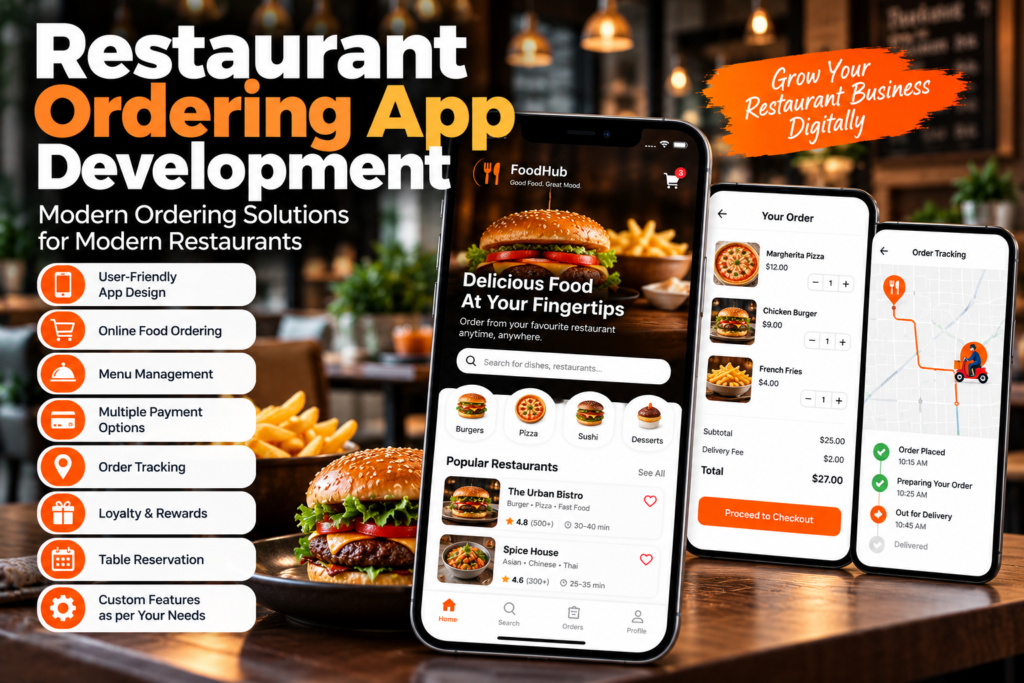
In today’s digital marketplace, customers increasingly expect convenient ways to browse menus, customise meals and order food directly from their smartphones. For restaurants looking to improve customer convenience, streamline operations and build stronger customer relationships, Restaurant Ordering App Development can be a valuable business investment.
A well-designed restaurant ordering app allows customers to place orders, make payments and track their purchases without relying entirely on third-party food delivery platforms. Depending on the business model, it can support takeaway, collection, delivery, table ordering and loyalty programmes.
However, building a successful app requires more than adding a digital menu and a checkout button. Restaurants need to consider user experience, payment security, order management, delivery tracking, integrations and ongoing maintenance.
In this guide, we’ll explore the essential features of Restaurant Ordering App Development, explain why each feature matters and show how restaurants can plan an app that supports their business goals.
What Is Restaurant Ordering App Development?
Restaurant Ordering App Development is the process of designing, building, testing and maintaining a mobile application that enables customers to order food from a restaurant.
The app may be developed for iOS, Android or both platforms. Some restaurants also choose a web-based ordering experience that customers can access through a browser.
A restaurant ordering app typically connects several functions, including:
- Digital menu browsing
- Food customisation
- Shopping cart management
- Online payments
- Order confirmation
- Order status updates
- Delivery or collection options
- Customer accounts
- Loyalty rewards
- Restaurant order management
The exact functionality depends on the restaurant’s size, target customers and operational requirements.
For a small takeaway, a straightforward ordering app may be sufficient. A restaurant chain, by contrast, may require multiple-location support, advanced reporting, integrated loyalty programmes and centralised menu management.
Why Is Restaurant Ordering App Development Important?
Customers value convenience, clear information and a smooth ordering experience. A well-planned app can bring these elements together while helping a restaurant manage its digital sales channel.
1. Improve Customer Convenience
Customers can browse the menu, select meals and place orders without needing to call the restaurant.
A straightforward ordering process can make purchasing easier, particularly for repeat customers.
2. Support Direct Orders
A restaurant’s own app can provide an additional way to receive direct orders. Depending on the business model, this may reduce reliance on third-party platforms and their associated commissions.
However, the actual financial benefit depends on development costs, payment processing fees, marketing expenses and customer acquisition.
3. Build Customer Loyalty
Features such as loyalty points, personalised offers and saved favourites can encourage customers to return.
A loyalty programme should provide genuine value rather than relying on excessive notifications or complicated reward conditions.
4. Improve Order Management
A connected order management system can help staff receive, prepare and update orders more efficiently.
This can reduce manual communication and improve visibility across the ordering process.
5. Access Useful Business Data
Restaurant ordering apps can provide information about popular menu items, order frequency, average basket value and customer purchasing patterns.
When collected and used appropriately, this information can help restaurants make more informed business decisions.
10 Essential Features of Restaurant Ordering App Development
The most effective restaurant apps combine an easy customer experience with practical tools for restaurant staff.
1. User-Friendly Registration and Login
The first interaction with an app should be simple.
Customers should be able to create an account and access the ordering experience without unnecessary steps. Depending on the app, login options may include email, phone number or supported third-party authentication.
Essential account features can include:
- Simple registration
- Secure login
- Password recovery
- Saved delivery addresses
- Order history
- Saved favourites
- Account management
Consider allowing customers to browse the menu before registering. Requiring an account too early can create friction and cause potential customers to abandon the process.
For successful Restaurant Ordering App Development, account creation should support convenience rather than become a barrier to ordering.
2. Digital Menu With High-Quality Images
The digital menu is one of the most important parts of any restaurant ordering app.
Customers need to understand what is available, how much it costs and what each dish contains.
A useful menu should include:
- Clear food names
- Accurate descriptions
- Prices
- High-quality photographs where appropriate
- Menu categories
- Dietary and allergen information
- Portion or size options
- Availability status
- Meal customisation options
For example, customers ordering a burger might need to select the size, add toppings or choose a side dish.
Restaurant staff should also be able to update prices, mark items unavailable and change menu information without requiring a complete app update.
3. Smart Search and Menu Filters
As a menu grows, customers need a convenient way to find specific items.
Search and filtering features can help users locate meals according to their preferences.
Useful options may include:
- Vegetarian choices
- Vegan options
- Spicy dishes
- Popular meals
- Price ranges
- Meal categories
- Dietary preferences
Search should return relevant results quickly and display clear information about each item.
Restaurants must ensure that dietary and allergen labels are accurate. Filters should never imply that a meal is safe for someone with an allergy unless the relevant ingredients and cross-contact risks have been properly assessed.
4. Customisable Shopping Cart
A shopping cart allows customers to review their selections before placing an order.
A good cart should make it easy to change quantities, remove items and review the total price.
Important features include:
- Add or remove menu items
- Adjust quantities
- Select meal options
- Add special instructions where supported
- Apply valid discount codes
- View delivery charges
- Review taxes and fees
- See the final total before payment
The app should clearly communicate when a selected item or option becomes unavailable.
During Restaurant Ordering App Development, the cart should be tested carefully to ensure that prices, quantities and customisations remain accurate throughout the checkout process.
5. Secure Online Payment Integration
Customers should be able to pay using convenient, supported payment methods.
Depending on the target market and payment provider, these may include debit cards, credit cards, digital wallets or other supported payment options.
Payment functionality should provide:
- Secure payment processing
- Clear payment confirmation
- Transparent fees
- Appropriate error messages
- Protection against duplicate submissions
- Refund handling
- Transaction records
Restaurants should use reputable payment providers and avoid storing sensitive card information unnecessarily.
Payment security requirements depend on the implementation and applicable standards. A qualified development team should account for relevant payment security obligations and data protection requirements.
A smooth checkout experience is essential, but it should never come at the expense of customer security.
6. Real-Time Order Status and Notifications
Customers want to know whether their order has been received and when it is likely to be ready.
Order status updates can make the experience more transparent.
A restaurant ordering app may display stages such as:
- Order received
- Payment confirmed
- Order accepted
- Preparation in progress
- Ready for collection or dispatched
- Completed or delivered
The exact stages depend on the restaurant’s workflow.
Push notifications, email updates or text messages can inform customers about important changes, subject to appropriate consent and communication preferences.
Restaurants should avoid displaying inaccurate status information. Updates should reflect the actual order process as closely as possible.
7. Delivery and Collection Management
Not every restaurant operates in the same way. Some offer collection only, while others provide delivery, dine-in ordering or a combination of services.
Restaurant Ordering App Development should account for the restaurant’s actual fulfilment process.
Useful features can include:
- Delivery address selection
- Delivery-zone validation
- Collection time selection
- Estimated preparation times
- Delivery fees
- Minimum order values
- Scheduled orders
- Delivery instructions
- Order-ready notifications
If the restaurant manages its own delivery team, it may also need driver assignment and delivery status features.
Third-party delivery integrations can be considered where appropriate, but their availability and technical requirements should be confirmed before development begins.
8. Loyalty Programmes and Promotional Offers
Customer retention can be an important part of a restaurant’s digital strategy.
A loyalty programme can reward repeat purchases and give customers a reason to order directly through the app.
Possible features include:
- Points for eligible purchases
- Reward redemption
- Digital vouchers
- Birthday offers
- Promotional codes
- Referral rewards
- Member-only promotions
- Personalised offers
The rules should be easy to understand. Customers should know how points are earned, when rewards expire and which purchases qualify.
Promotional tools should also give restaurant managers control over campaign dates, eligibility and redemption limits.
9. Admin Dashboard and Restaurant Management
A customer-facing app is only one part of the system. Restaurant staff also need an efficient way to manage orders and menu information.
An admin dashboard can allow authorised staff to:
- Receive and manage orders
- Update menu items and prices
- Mark items unavailable
- Manage opening hours
- Configure delivery areas
- Update order statuses
- Create promotional offers
- Review sales information
- Manage customer support requests
Access controls should ensure that staff can only perform actions appropriate to their responsibilities.
For restaurant groups, the dashboard may also need location-specific menus, pricing and order management.
A well-designed dashboard can make Restaurant Ordering App Development more useful by connecting the customer experience with daily restaurant operations.
10. Reviews, Analytics and Performance Reporting
Analytics can help restaurant owners understand how customers use the app and where improvements may be needed.
Useful measurements can include:
- Number of orders
- Average order value
- Popular menu items
- Repeat purchase rate
- Cart abandonment
- Promotional campaign performance
- Payment failures
- Order preparation times
- Customer feedback
These metrics should be interpreted in context. For example, a rise in orders may not necessarily improve profitability if discounts or delivery costs are too high.
Customer reviews and feedback tools can also help restaurants identify recurring issues and improve service quality.
Collect only the data needed for legitimate business purposes, protect it appropriately and explain relevant data practices to users.
Additional Features to Consider
Beyond the ten essential features, some restaurants may benefit from more advanced functionality.
Table Reservations
Restaurants that accept bookings can integrate a reservation feature or connect the app to an existing booking platform.
QR Code Ordering
Customers can scan a QR code at a table to open a menu and place an order from their phone.
Multiple Restaurant Locations
Restaurant groups may need customers to select a branch based on their location or preferred collection point.
Customer Support
In-app help, frequently asked questions and order-related support can help resolve problems without lengthy phone calls.
Accessibility Features
Readable text, adequate contrast, clear navigation and accessible controls help make the app usable by more customers.
Multi-Language Support
Restaurants serving diverse customer groups may benefit from language options, provided translations are accurate and consistently maintained.
Not every restaurant needs every feature. Prioritise functions that address genuine customer needs or operational challenges.
Restaurant Ordering App Development: Native vs Cross-Platform Apps
One of the key technical decisions is how the app will be built.
| Factor | Native Development | Cross-Platform Development |
|---|---|---|
| Platform approach | Separate iOS and Android implementations | Shared codebase for supported platforms |
| Development effort | Can be higher across two platforms | Can reduce duplicated work |
| User experience | Strong platform-specific control | Can provide a consistent experience across platforms |
| Device integration | Direct access to platform capabilities | Depends on framework and integrations |
| Maintenance | Platform-specific updates may be needed | Shared updates may simplify some maintenance |
| Best suited to | Apps needing extensive platform-specific features | Many restaurant apps serving both platforms |
Neither approach is automatically superior. The best choice depends on the required features, development team’s expertise, budget and long-term maintenance plan.
For many restaurants, cross-platform development can be a practical way to support both iOS and Android without maintaining two entirely separate codebases.
How Much Does Restaurant Ordering App Development Cost?
The cost of Restaurant Ordering App Development depends on the complexity of the app and the services required.
Factors that influence the budget include:
- Number of supported platforms
- UI and UX design
- Menu and cart functionality
- Payment integration
- Delivery management
- Admin dashboard
- Loyalty programme
- Third-party integrations
- Security and testing
- Ongoing maintenance
A simple ordering app with a basic menu, checkout and order management system will generally require less work than a multi-location platform with advanced delivery tracking, loyalty features and custom integrations.
Ask development providers to separate the initial build cost from ongoing expenses such as hosting, payment processing, support and future updates.
A phased approach can help control spending: launch with the essential features, collect feedback and add more advanced functions when there is a clear business case.
How to Plan a Successful Restaurant Ordering App
Before starting development, define what the app needs to achieve.
Step 1: Identify Your Business Goals
Decide whether the main objective is increasing direct orders, improving collection, supporting delivery or building customer loyalty.
Step 2: Understand Your Customers
Consider how customers currently order, which devices they use and what causes problems in the existing process.
Step 3: Define the Essential Features
Prioritise the functions needed for a reliable first release. Avoid adding expensive features that do not solve a clear problem.
Step 4: Design the Customer Journey
Map the steps from opening the app to completing an order. Keep navigation, menu browsing and checkout straightforward.
Step 5: Select the Technology
Choose native, cross-platform or another suitable approach based on the app’s requirements and available budget.
Step 6: Integrate Restaurant Systems
Determine whether the app needs to connect to payment providers, point-of-sale software, kitchen systems or delivery services.
Step 7: Test Before Launch
Test ordering, payment, refunds, notifications, menu updates, accessibility and performance on supported devices.
Step 8: Monitor and Improve
After launch, review customer feedback and analytics. Use this information to fix problems and prioritise improvements.
Common Mistakes to Avoid
Restaurant Ordering App Development can become unnecessarily expensive or ineffective when planning is rushed.
Avoid these common mistakes:
- Building an app without understanding customer needs
- Making the menu difficult to browse
- Adding too many checkout steps
- Hiding delivery charges until the final stage
- Providing unclear payment errors
- Ignoring mobile accessibility
- Failing to test busy-period order volumes
- Overlooking privacy and security
- Launching without a plan for updates
- Adding loyalty features without clear reward rules
A successful app should make ordering easier for customers while remaining manageable for restaurant staff.
Choosing a Restaurant Ordering App Development Company
If you plan to work with a development agency, look beyond the initial quotation.
Ask potential providers about:
- Relevant restaurant or e-commerce projects
- UI and UX design process
- Payment integration experience
- Security and privacy practices
- Testing procedures
- App store submission support
- Ownership of the code and design assets
- Maintenance and support arrangements
- Future feature development
- Project timelines and deliverables
Request a clear proposal outlining what will be delivered, what is excluded and how future changes will be priced.
The right development partner should understand both the technical requirements and the realities of restaurant operations.
Final Verdict: Restaurant Ordering App Development
Restaurant Ordering App Development can help restaurants create a more convenient ordering experience, support direct sales and improve visibility into day-to-day operations.
The most important features typically include a user-friendly account experience, accurate digital menu, smart search, customisable cart, secure payments, order updates, delivery or collection management, loyalty tools, an admin dashboard and useful analytics.
However, a successful app is not defined by the number of features it contains. It is defined by how effectively those features solve customer and business problems.
Start with a clear plan, prioritise a simple ordering journey, choose technology that fits your needs and invest in reliable testing and maintenance. Add advanced functionality when it supports a measurable business objective.
Ready to Build Your Restaurant Ordering App?
Looking to improve online ordering for your restaurant? Work with an experienced development team to plan an app that matches your menu, payment requirements, delivery process and customer expectations.
Start planning your Restaurant Ordering App Development project today and create a convenient digital experience that helps customers order with confidence.
FAQs About Restaurant Ordering App Development
What is Restaurant Ordering App Development?
Restaurant Ordering App Development is the process of designing, building and maintaining an app that allows customers to browse menus, place food orders, make payments and receive order updates.
What features should a restaurant ordering app include?
Essential features often include a digital menu, search and filters, shopping cart, secure payments, order tracking, delivery or collection options, customer accounts and an admin dashboard.
How much does Restaurant Ordering App Development cost?
The cost depends on the app’s complexity, supported platforms, integrations, design, testing and maintenance requirements. A detailed specification is the best starting point for obtaining an accurate quote.
How long does it take to develop a restaurant ordering app?
The timeline depends on the number of features, integrations and platforms. A basic app generally requires less development time than a complex multi-location ordering system. Ask providers for a project schedule based on your requirements.
Should I build a native or cross-platform restaurant app?
Native development can offer greater platform-specific control, while cross-platform development may reduce duplicated work when supporting iOS and Android. The best approach depends on your requirements, budget and maintenance needs.
Can a restaurant ordering app accept online payments?
Yes. An app can integrate with a suitable payment provider to accept supported payment methods. Payment processing, security requirements and transaction fees should be reviewed before selecting a provider.
Can I integrate a restaurant ordering app with a POS system?
Potentially, yes. Integration depends on the point-of-sale system, its available interfaces and the app’s technical architecture. Confirm compatibility with both providers before development begins.
How can a restaurant ordering app improve customer loyalty?
Features such as points, vouchers, saved favourites and relevant promotions can encourage repeat orders. The programme should offer clear benefits and straightforward rules.
Does a restaurant ordering app need an admin dashboard?
An admin dashboard is highly useful for managing orders, updating menus, controlling availability, reviewing sales and administering promotions. Its complexity should match the restaurant’s operational needs.
Is restaurant app maintenance necessary after launch?
Yes. Maintenance can include security updates, compatibility fixes, bug repairs, performance improvements and updates to third-party integrations.
Can a restaurant ordering app reduce third-party delivery commissions?
A direct ordering app can provide another sales channel and may reduce reliance on third-party platforms. However, development, payment processing, marketing and fulfilment costs still need to be considered.
How can I make my restaurant ordering app successful?
Focus on a simple customer journey, accurate menus, transparent pricing, secure payments, reliable order handling and ongoing improvements based on customer feedback and app performance.